How to Build a Digital Wardrobe in 2026: The Complete Guide
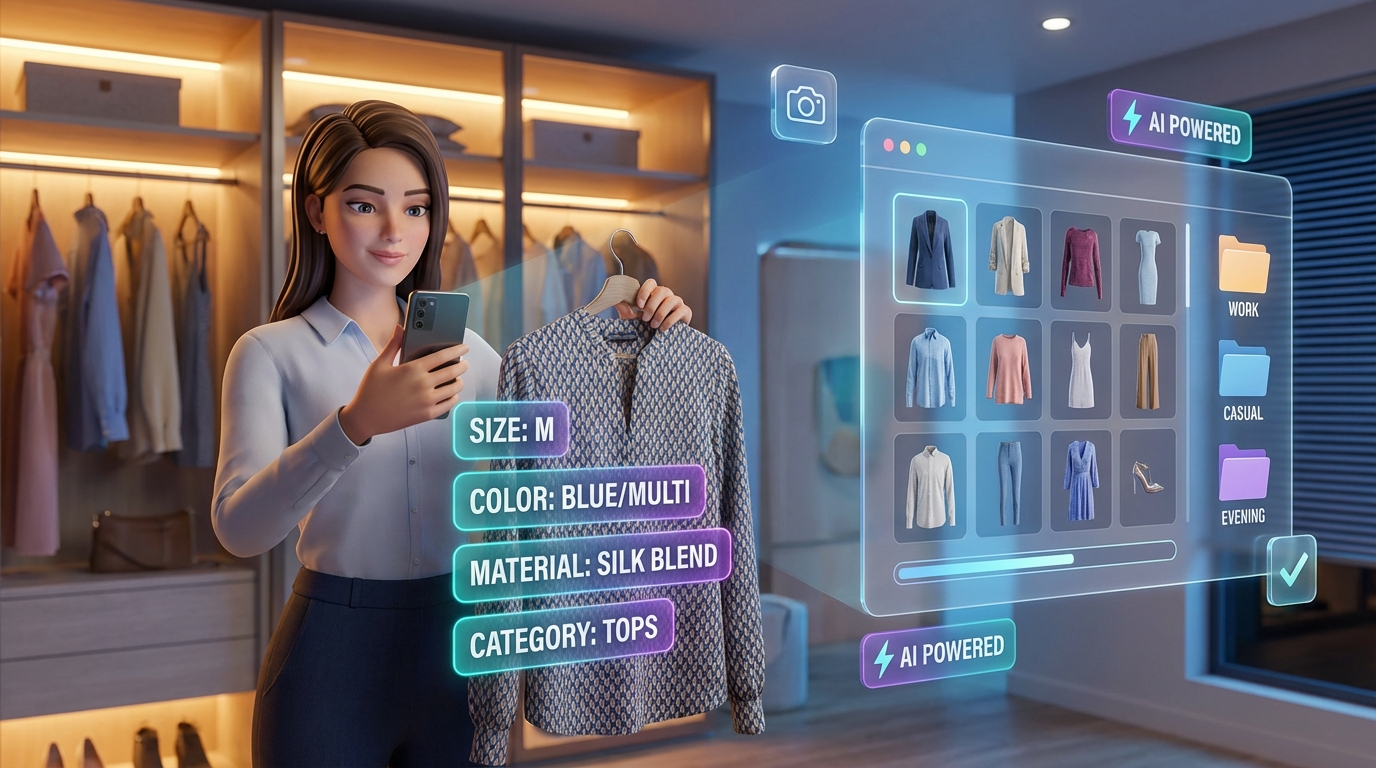
Standing in front of a packed closet at 7:45 AM, already running late, thinking "I have literally nothing to wear"—yeah, we've all been there. And here's the kicker: studies show most of us wear only 20% of our wardrobe regularly. The other 80%? Just hanging out (pun intended) collecting dust.
The solution? A digital wardrobe—basically a virtual catalog of everything you own that actually helps you remember what's in there and how to style it.
In this comprehensive guide, you'll learn exactly how to build your digital wardrobe in 2026, using the latest AI technology to make the process effortless.
What is a Digital Wardrobe?
A digital wardrobe (also called a virtual wardrobe or digital closet) is a digital catalog of all your clothing, shoes, and accessories. Think of it as an Instagram feed, but exclusively for your closet.
Instead of rummaging through drawers and hangers, you can:
- Browse your entire collection on your phone or computer
- Search for specific items by color, type, or occasion
- Plan outfits by virtually trying different combinations
- Track what you wear and what sits unused
- Remember items you forgot you owned
Why You Need a Digital Wardrobe in 2026
The benefits go far beyond just organization:
1. Save Time Every Morning No more standing in front of your closet for 20 minutes. Plan your week's outfits in advance or get AI-powered suggestions based on your schedule and weather.
2. Reduce Duplicate Purchases Ever bought a black t-shirt only to come home and realize you already have three? A digital wardrobe prevents this by giving you a complete visual inventory.
3. Maximize What You Own Discover new outfit combinations from clothes you already own. Most people wear the same 10-15 outfits on rotation - a digital wardrobe helps you use your entire closet.
4. Make Smarter Shopping Decisions See exactly what's missing from your wardrobe before buying. No more impulse purchases that don't match anything you own.
5. Pack Like a Pro Planning a trip? Easily select and visualize outfits before you pack, ensuring you have the perfect outfit for every occasion without overpacking.
6. Reduce Decision Fatigue Successful people like Steve Jobs and Mark Zuckerberg famously wore "uniforms" to reduce daily decisions. A digital wardrobe gives you similar benefits while maintaining style variety.
Step-by-Step: How to Build Your Digital Wardrobe
Step 1: Choose Your Digital Wardrobe Platform
The first decision is choosing the right tool. In 2026, you have several options:
Manual Methods (Not Recommended):
- Spreadsheets: Time-consuming, no visual preview
- Photo folders: Disorganized, hard to search
Smart Digital Wardrobe Apps (Recommended):
- AI-Powered Platforms like CuffLinkAI: Automatic tagging, virtual try-on, outfit suggestions
- Basic Wardrobe Apps: Manual entry, simple organization
What to Look For:
- ✅ AI auto-tagging (saves hours of manual work)
- ✅ Virtual try-on capabilities
- ✅ Outfit planning features
- ✅ Search and filter functions
- ✅ Mobile and web access
- ✅ Cloud sync across devices
For this guide, we'll use CuffLinkAI as an example, but the principles apply to any digital wardrobe platform.
Step 2: Photograph Your Clothing
This is the most time-intensive part, but AI technology has made it much faster.
The Traditional Method (2-4 hours):
- Lay each item flat on a neutral background
- Take a clear, well-lit photo
- Repeat for every item in your closet
- Upload and manually tag each photo
The Modern AI Method (30-60 minutes):
- Quickly snap photos of items (even on hangers)
- Upload in bulk to your digital wardrobe app
- AI automatically detects and categorizes items
- Review and adjust if needed
Pro Photography Tips:
- Lighting: Use natural light near a window, or ensure good overhead lighting
- Background: White or neutral walls work best (but AI can remove backgrounds)
- Angle: Lay items flat or hang them - just be consistent
- Details: Capture patterns, textures, and true colors
- Batch Process: Do one category at a time (all tops, then all bottoms, etc.)
Time-Saving Hack: Don't stress about perfect photos. Modern AI can handle wrinkled clothing, unclear backgrounds, and even items on hangers. The goal is to get your wardrobe digitized quickly.
Step 3: Let AI Do the Heavy Lifting
This is where 2026 technology shines. Instead of manually entering details for each item, AI automatically:
Auto-Detection:
- Clothing Type: T-shirt, blouse, jeans, dress, jacket, shoes, etc.
- Color: Primary and secondary colors
- Pattern: Solid, striped, floral, plaid, etc.
- Season: Summer, winter, all-season based on material and style
- Formality Level: Casual, business casual, formal
- Material Type: Cotton, denim, silk, wool (advanced AI)
Example: Upload a photo of a blue striped button-down shirt. AI automatically tags it as:
- Type: Shirt, Button-down
- Color: Blue, White
- Pattern: Striped
- Season: All-season
- Occasion: Business casual, Casual
- Material: Cotton
With platforms like CuffLinkAI, this happens in seconds per item.
Step 4: Organize Your Digital Closet
Now that your items are uploaded and tagged, it's time to organize them for easy access.
Recommended Organization System:
By Category:
- Tops (T-shirts, blouses, sweaters, tanks)
- Bottoms (Jeans, trousers, skirts, shorts)
- Dresses & Jumpsuits
- Outerwear (Jackets, coats, blazers)
- Shoes
- Accessories (Bags, belts, jewelry, scarves)
By Season:
- Spring/Summer
- Fall/Winter
- All-Season
By Occasion:
- Casual
- Work/Professional
- Formal Events
- Active/Gym
- Special Occasions
By Color:
- Organize by color families for easy coordination
- Create color palette collections
Pro Tip: Use multiple tags per item. A black blazer could be tagged as:
- Category: Outerwear, Blazer
- Season: All-season
- Occasion: Work, Formal, Business Casual
- Color: Black
This allows you to find it no matter how you search.
Step 5: Create Outfit Combinations
This is where your digital wardrobe becomes truly powerful.
Manual Outfit Creation:
- Select items from different categories
- Drag and drop to create an outfit
- Save combinations for future reference
- Name outfits by occasion ("Monday Meeting", "Date Night", "Coffee Run")
AI-Powered Outfit Suggestions (The Future is Here): Modern platforms analyze your wardrobe and automatically suggest:
- Occasion-Based Outfits: "What should I wear to a wedding?"
- Weather-Appropriate Combinations: "Outfit for 65°F and cloudy"
- Color-Coordinated Looks: AI understands color theory and matching
- Style Scoring: Get a match score (0-100%) showing how well items work together
Example with CuffLinkAI:
- Select occasion: "Business Meeting"
- AI generates 5-10 outfit combinations from your wardrobe
- Each outfit includes a match score and explanation
- Try on outfits virtually to see how they look on you
- Save favorites for future wear
Virtual Try-On: The latest AI technology allows you to:
- Upload one photo of yourself
- See any outfit combination on your body
- Visualize before getting dressed
- Share outfit photos with friends for feedback
This is a game-changer for outfit planning.
Step 6: Maintain Your Digital Wardrobe
Your digital wardrobe is only useful if it's up-to-date.
Best Practices:
When You Buy New Items:
- Photograph and add immediately
- Tag before removing the store tags
- Takes 30 seconds with AI auto-tagging
When You Donate/Discard Items:
- Archive or delete from your digital wardrobe
- Prevents confusion when planning outfits
Seasonal Updates:
- Every 3-6 months, review your wardrobe
- Archive out-of-season items (or mark them as "stored")
- This keeps your active wardrobe current and relevant
Track What You Wear:
- Mark outfits as worn (some apps do this automatically)
- Identify items you never wear
- Make informed decisions about what to keep
Regular Maintenance Schedule:
- Weekly: Add new purchases
- Monthly: Review and clean up
- Seasonally: Major organization and purge
Advanced Digital Wardrobe Features in 2026
1. Trip Planning Integration
Going on vacation? Use your digital wardrobe to:
- Plan outfits for each day of your trip
- Create a packing list based on your selected outfits
- Ensure you have the right clothes for every activity
- Avoid overpacking while maintaining outfit variety
Example Trip Planner Workflow:
- Enter destination and trip length
- AI suggests appropriate outfits based on weather and activities
- Select your favorite combinations
- Export a packing checklist
- Pack with confidence
This feature is perfect for frequent travelers, content creators, and anyone who stresses about packing.
2. Style Analytics
Advanced platforms provide insights like:
- Wear Frequency: Which items do you actually wear?
- Cost Per Wear: Was that expensive jacket worth it?
- Color Preferences: What colors dominate your wardrobe?
- Outfit Patterns: Do you always wear the same combinations?
- Gap Analysis: What's missing from your wardrobe?
These insights help you make smarter shopping decisions and maximize ROI on your clothing.
3. Social Features
Share your style:
- Get outfit feedback from friends before an event
- Share favorite combinations on social media
- Discover how others style similar items
- Create outfit inspiration boards
Digital Wardrobe vs. Physical Closet Organization
You might be wondering: "Should I still organize my physical closet?"
The Answer: Yes, but differently.
Physical Closet Best Practices:
- Categorize: Group similar items together (all dresses, all jeans, etc.)
- Make it Visual: Arrange by color within categories for easy scanning
- Accessibility: Keep current season items in front, off-season in back or storage
- Declutter Regularly: Donate items you haven't worn in 12 months
How Digital Complements Physical:
- Use your digital wardrobe to plan outfits
- Use your physical closet to retrieve items quickly
- The digital system helps you remember where things are
- The physical system stores the actual clothes
Together, they create a seamless wardrobe management system.
Common Questions About Digital Wardrobes
"Isn't this time-consuming to set up?"
Initial setup: 30-60 minutes with AI auto-tagging (vs. 3-4 hours manually) Long-term time savings: 10-20 minutes per day in outfit planning
You'll recover your time investment in the first week.
"What if I have hundreds of items?"
AI-powered platforms handle large wardrobes effortlessly. Some users have cataloged 500+ items. The key is bulk uploading and letting AI do the tagging.
"Do I need to photograph everything, including underwear and socks?"
No. Focus on visible items:
- Tops, bottoms, dresses, outerwear
- Shoes (especially statement pieces)
- Accessories (bags, scarves, jewelry)
Skip basics like underwear, basic socks, and plain undershirts unless they're statement pieces.
"What if my style changes?"
Your digital wardrobe evolves with you. Add new items, archive old ones, and adjust tags as your style develops. It's a living system, not a static catalog.
"Is my data private?"
Reputable platforms use encryption and never share your photos publicly without permission. Always check the privacy policy, but your wardrobe data is typically more secure than your social media.
Real User Success Stories
Sarah, Content Creator: "As a travel influencer, I used to overpack for every trip because I'd forget what I had. Now I plan outfits digitally and pack exactly what I need. I've reduced my luggage by 40% while still creating diverse content."
David, Corporate Executive: "I travel for work 3 weeks per month. My digital wardrobe lets me plan professional outfits in advance. I know exactly what's clean, what matches, and what I need to pack. It's saved me hours of decision-making."
Emma, College Student: "On a student budget, I can't afford to buy duplicates or impulse shop. My digital wardrobe shows me exactly what I own and helps me create new outfits from old clothes. It's like having a free personal stylist."
Getting Started: Your First Week with a Digital Wardrobe
- Day 1-2: Set up your account and photograph your current wardrobe
- Day 3: Let AI tag and organize your items (review for accuracy)
- Day 4: Create your first 5 outfit combinations
- Day 5: Try the virtual try-on feature
- Day 6: Plan next week's outfits in advance
- Day 7: Reflect on time saved and outfit satisfaction
By week 2, using your digital wardrobe will feel natural. By week 4, you won't remember how you lived without it.
The Future of Digital Wardrobes
As we move further into 2026 and beyond, expect:
- Even Smarter AI: Better outfit recommendations based on your personal style
- Augmented Reality: Virtual try-on using phone cameras in real-time
- Sustainability Tracking: Measure your fashion footprint
- Automated Shopping: AI identifies gaps and suggests purchases
- Community Features: Style inspiration from people with similar wardrobes
The technology is evolving rapidly, making digital wardrobes more powerful and user-friendly every year.
Conclusion: Transform Your Relationship with Your Closet
Building a digital wardrobe in 2026 is easier than ever, thanks to AI technology that does the heavy lifting for you. What once took hours now takes minutes.
The benefits are immediate:
- ✅ Save 10-20 minutes every morning
- ✅ Reduce clothing purchases by 30%
- ✅ Increase wardrobe utilization by 50%
- ✅ Eliminate "nothing to wear" syndrome
- ✅ Pack perfectly for every trip
- ✅ Develop your personal style with confidence
Whether you're a busy professional, content creator, frequent traveler, or simply want to organize your closet better, a digital wardrobe is the solution you've been looking for.
Ready to Build Your Digital Wardrobe?
Get started with CuffLinkAI for free today:
Start Your Free Digital Wardrobe →
What you'll get:
- ✨ AI-powered auto-tagging and organization
- 👗 Virtual try-on technology
- 🤖 Smart outfit recommendations with match scores
- ✈️ Trip planning and packing assistance
- 📱 Access on web and mobile
Stop wasting time deciding what to wear. Start maximizing the wardrobe you already own.
Your closet, organized. Your outfits, planned. Your mornings, simplified.